Installation and activation of dracut RAM-Wipe module to wiping memory on shutdown for protection against cold‑boot attack in Qubes.
A cold boot attack is a type of computer security attack that involves accessing sensitive information from a computer’s random access memory (RAM) after the computer has been turned off or restarted. Normally, when a computer is turned off or restarted, the data in the RAM is erased. However, with a cold boot attack, the attacker can quickly freeze the RAM before it loses its contents, and transfer RAM to another computer to read its contents. This allows the attacker to access sensitive information, such as encryption keys or login credentials, that were stored in the RAM.
RAM-Wipe module was created by the Kicksecure / Whonix devs: GitHub - Kicksecure/ram-wipe: Wipe RAM on shutdown and reboot - Cold Boot Attack Defense
RAM-Wipe has undergone a security audit: Thoughts dereferenced from the scratchpad noise. | ram-wipe: Further analysis
A similar module is used by Tails.
This is an excellent tool against cold‑boot attacks.
This guide solves the old problem of Wipe RAM on shutdown in Qubes
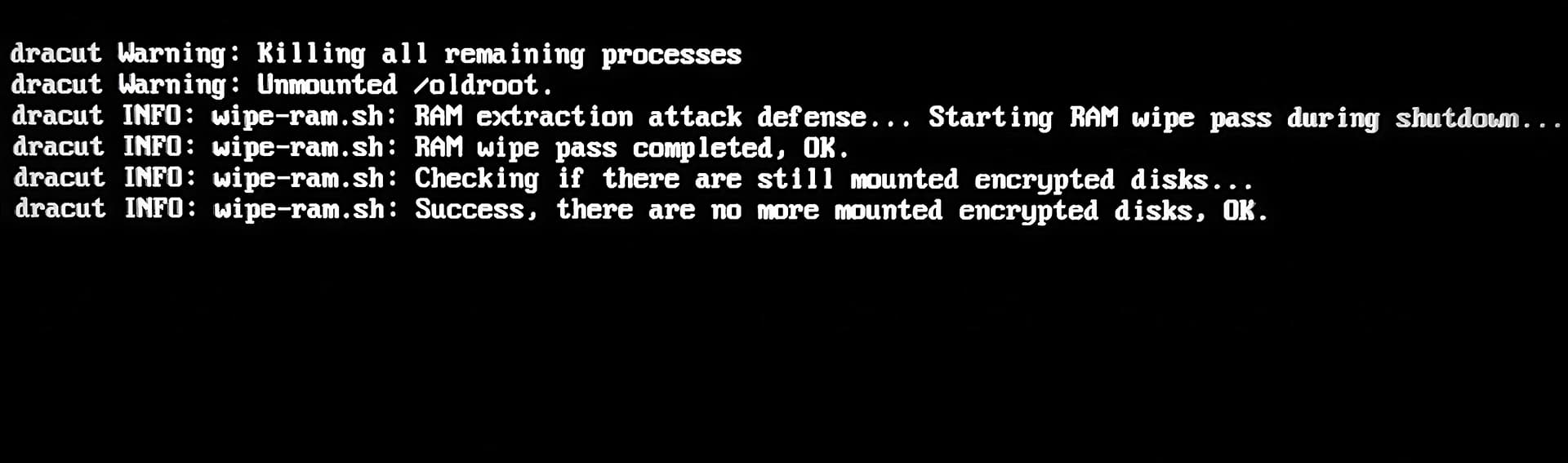
You will see new entries after shutdown Qubes.
It also works great and enhances Qubes security in Live‑Mode for maximum protection against forensic analysis: Qubes OS live mode. dom0 in RAM. Non-persistent Boot. Protection against forensics. Tails mode. Hardening dom0
 A problem with this solution could be that the system takes too long to shutdown in critically dangerous moments (10-30 seconds). Use the solutions from this discussion to create an “emergency button” that powers off the system within a few seconds. For example,
 xfce4-session-logout --halt -f
Also use USB Kill Switch for Qubes OS - Physical Security Enhancement
I created a script that will build the module in a few seconds and add it to dracut.
Save the script, for example, with the name wipe.sh into /home/user/
Make the file executable. Run in terminal sudo chmod +x wipe.sh or tick the box in File Properties → Permissions → Program:
Copy file to dom0. Run it in dom0 terminal qvm-run --pass-io <qube-name> 'cat /home/user/wipe.sh' > wipe.sh
Run it with sudo: sudo ./wipe.sh
#!/bin/bash

# Script to install dracut ram-wipe module

echo "Creating dracut ram-wipe module directories and files..."

# Create module directory
mkdir /usr/lib/dracut/modules.d/40ram-wipe/

# module-setup.sh
cat > /usr/lib/dracut/modules.d/40ram-wipe/module-setup.sh << 'EOF'
#!/bin/bash
# -*- mode: shell-script; indent-tabs-mode: nil; sh-basic-offset: 4; -*-
# ex: ts=8 sw=4 sts=4 et filetype=sh

## Copyright (C) 2023 - 2025 ENCRYPTED SUPPORT LLC <adrelanos@whonix.org>
## See the file COPYING for copying conditions.

# called by dracut
check() {
   require_binaries sync || return 1
   require_binaries sleep || return 1
   require_binaries dmsetup || return 1
   return 0
}

# called by dracut
depends() {
   return 0
}

# called by dracut
install() {
   inst_simple "/usr/libexec/ram-wipe/ram-wipe-lib.sh" "/lib/ram-wipe-lib.sh"
   inst_multiple sync
   inst_multiple sleep
   inst_multiple dmsetup
   inst_hook shutdown 40 "$moddir/wipe-ram.sh"
   inst_hook cleanup 80 "$moddir/wipe-ram-needshutdown.sh"
}

# called by dracut
installkernel() {
   return 0
}
EOF

chmod +x /usr/lib/dracut/modules.d/40ram-wipe/module-setup.sh

# wipe-ram-needshutdown.sh
cat > /usr/lib/dracut/modules.d/40ram-wipe/wipe-ram-needshutdown.sh << 'EOF'
#!/bin/sh

## Copyright (C) 2023 - 2025 ENCRYPTED SUPPORT LLC <adrelanos@whonix.org>
## See the file COPYING for copying conditions.

type getarg >/dev/null 2>&1 || . /lib/dracut-lib.sh

. /lib/ram-wipe-lib.sh

ram_wipe_check_needshutdown() {
   ## 'local' is unavailable in 'sh'.
   #local kernel_wiperam_setting

   kernel_wiperam_setting="$(getarg wiperam)"

   if [ "$kernel_wiperam_setting" = "skip" ]; then
      force_echo "wipe-ram-needshutdown.sh: Skip, because wiperam=skip kernel parameter detected, OK."
      return 0
   fi

   true "wipe-ram-needshutdown.sh: Calling dracut function need_shutdown to drop back into initramfs at shutdown, OK."
   need_shutdown

   return 0
}

ram_wipe_check_needshutdown
EOF

chmod +x /usr/lib/dracut/modules.d/40ram-wipe/wipe-ram-needshutdown.sh

# wipe-ram.sh
cat > /usr/lib/dracut/modules.d/40ram-wipe/wipe-ram.sh << 'EOF'
#!/bin/sh

## Copyright (C) 2023 - 2025 ENCRYPTED SUPPORT LLC <adrelanos@whonix.org>
## See the file COPYING for copying conditions.

## Credits:
## First version by @friedy10.
## https://github.com/friedy10/dracut/blob/master/modules.d/40sdmem/wipe.sh

## Use '.' and not 'source' in 'sh'.
. /lib/ram-wipe-lib.sh

drop_caches() {
   sync
   ## https://gitlab.tails.boum.org/tails/tails/-/blob/master/config/chroot_local-includes/usr/local/lib/initramfs-pre-shutdown-hook
   ### Ensure any remaining disk cache is erased by Linux' memory poisoning
   echo 3 > /proc/sys/vm/drop_caches
   sync
}

ram_wipe() {
   ## 'local' is unavailable in 'sh'.
   #local kernel_wiperam_setting dmsetup_actual_output dmsetup_expected_output

   ## getarg returns the last parameter only.
   kernel_wiperam_setting="$(getarg wiperam)"

   if [ "$kernel_wiperam_setting" = "skip" ]; then
      force_echo "wipe-ram.sh: Skip, because wiperam=skip kernel parameter detected, OK."
      return 0
   fi

   force_echo "wipe-ram.sh: RAM extraction attack defense... Starting RAM wipe pass during shutdown..."

   drop_caches

   force_echo "wipe-ram.sh: RAM wipe pass completed, OK."

   ## In theory might be better to check this beforehand, but the test is
   ## really fast.
   force_echo "wipe-ram.sh: Checking if there are still mounted encrypted disks..."

   ## TODO: use 'timeout'?
   dmsetup_actual_output="$(dmsetup ls --target crypt 2>&1)"
   dmsetup_expected_output="No devices found"

   if [ "$dmsetup_actual_output" = "$dmsetup_expected_output" ]; then
      force_echo "wipe-ram.sh: Success, there are no more mounted encrypted disks, OK."
   elif [ "$dmsetup_actual_output" = "" ]; then
      force_echo "wipe-ram.sh: Success, there are no more mounted encrypted disks, OK."
   else
      ## dracut should unmount the root encrypted disk cryptsetup luksClose during shutdown
      ## https://github.com/dracutdevs/dracut/issues/1888
      force_echo "\\
wipe-ram.sh: There are still mounted encrypted disks! RAM wipe incomplete!

debugging information:
dmsetup_expected_output: '$dmsetup_expected_output'
dmsetup_actual_output: '$dmsetup_actual_output'"
      ## How else could the user be informed that something is wrong?
      sleep 5
   fi
}

ram_wipe
EOF

chmod +x /usr/lib/dracut/modules.d/40ram-wipe/wipe-ram.sh

# dracut.conf.d
cat > /usr/lib/dracut/dracut.conf.d/30-ram-wipe.conf << 'EOF'
add_dracutmodules+=" ram-wipe "
EOF

# ram-wipe-lib.sh
mkdir /usr/libexec/ram-wipe
cat > /usr/libexec/ram-wipe/ram-wipe-lib.sh << 'EOF'
#!/bin/sh

## Copyright (C) 2023 - 2025 ENCRYPTED SUPPORT LLC <adrelanos@whonix.org>
## See the file COPYING for copying conditions.

## Based on:
## /usr/lib/dracut/modules.d/99base/dracut-lib.sh
if [ -z "$DRACUT_SYSTEMD" ]; then
    force_echo() {
        echo "<28>dracut INFO: $*" > /dev/kmsg
        echo "dracut INFO: $*" >&2
    }
else
    force_echo() {
        echo "INFO: $*" >&2
    }
fi
EOF

chmod +x /usr/libexec/ram-wipe/ram-wipe-lib.sh

# Update INITRAMFS
dracut --verbose --force
echo "ram-wipe module created successfully!"